✅ Objective Mode
If you’re reading this you’re insane, and you should know you’re in for a world of pain. I’ll try ease your suffering:
The Objectives
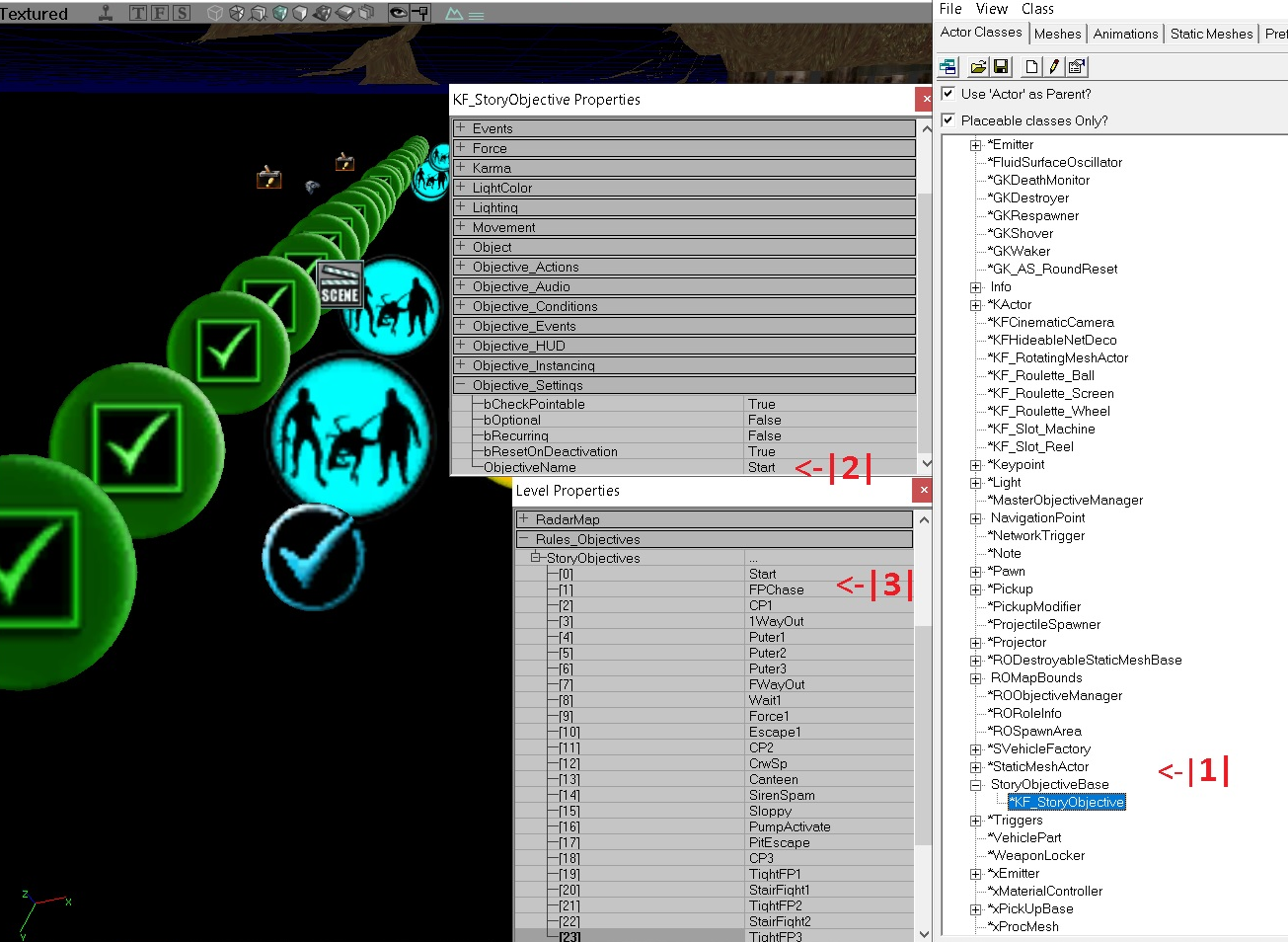
- This is where you can find the objective actor in the actor browser.
- For your objectives to work, they have to be named — the first objective is always named start (unless you’re special).
- Navigate to View → Level Properties or hit
F4to open this window. This is where you tell SDK your expected order of the objectives, by objective name.
That’s the easy part done.
Next, the most significant actor is probably KFLevelRules_Story
Found in: Actor Browser → Info → LevelGameRules → KFSPLevelInfo
^
With this actor you can customise player starting equipment, max zed number (default is 32), starting cash/cash bounty, and the shop (apparently).
As per its name it determines the general rules.
Tip: Objective Mode is a series of triggers and events that you set up yourself, just like story mode, but a wee bit more automated, has a semi-functioning HUD that looks pretty, and a funky agro system. So plan what you want to do, then figure out how to get it to work. Which actor is the cause of an event, when to trigger it, what does the trigger do?
Honourable Mention: Consider making a small KFO project to learn some ropes, then transfer to a KF- story map. It can do the same stuff excusing wave/squad designers. So less automation for zed spawns unless you code a mut of course.
Designing your Objectives
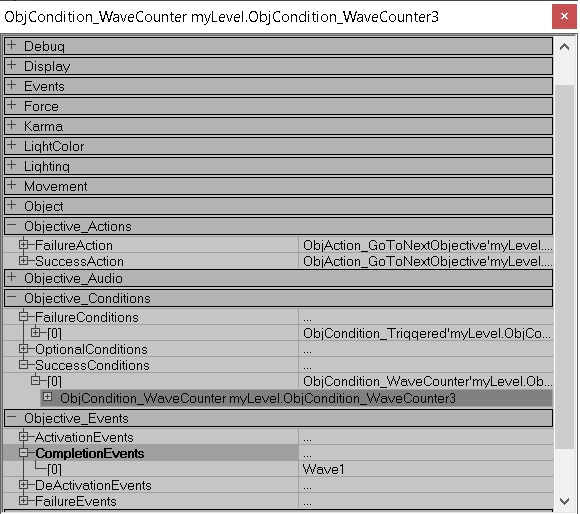
Objective Conditions — Typically whatever the player needs to do or avoid during that objective. But it doesn’t have to be! Remember you can disable HUD & add hidden event triggers or so on. When all the criteria you customise under success conditions are complete (Progress importance: normal), the objective will consider itself won. Likewise, when failure conditions are all met it considers itself lost.
Setting progress importance: critical, on an objective condition makes it so if that critical condition is satisfied at any point, the map moves on to the next objective — regardless of whether the other conditions were satisfied. It’s also worth noting that a team wipe is always a wipe — it’s built in, end of. You don’t need to add it to failure conditions so alternate routes for your objectives are possible.
Objective Actions — Here you customise what happens when you lose or win an objective. The options are:
Objective Events — Here you can customise triggerable events when the objective is activated, completed, deactivated, or failed. This can be linked to explosions, doors, sound effects, zed waves, STs, whatever, you get it yah? Add in the ones you need.
Trigger ObjCondition
Condition is a powerful scripting tool. For coders, it’s like your IfCondition, so you can even get used to adding non-objectives with no HUD and doing whatever you like. Here’s what you need to trigger a condition:

In Game UI (HUD - World Hint)
If your map is anything like a story map, players will get lost. World hints are text, textures or both that can float in the world as an aid. For example, the gold bar indicators in KFO-Steamland. This is what you need to get set up:
IgnoreWorldLocHidden is often missed. Keep hints short. It’s inconsistent on dedi servers so get a test server or use a static mesh mover (much like graffiti) instead.
You will see the hint from everywhere in the map so set up a non-objCondition to activate it based on an event. I recommend ProgressPct event from objCondition area — with rqr full team = false.
Dialogue Actor
Copy-paste from official map. Important notes:
CutScenes
(see endings of official maps or Mansion)
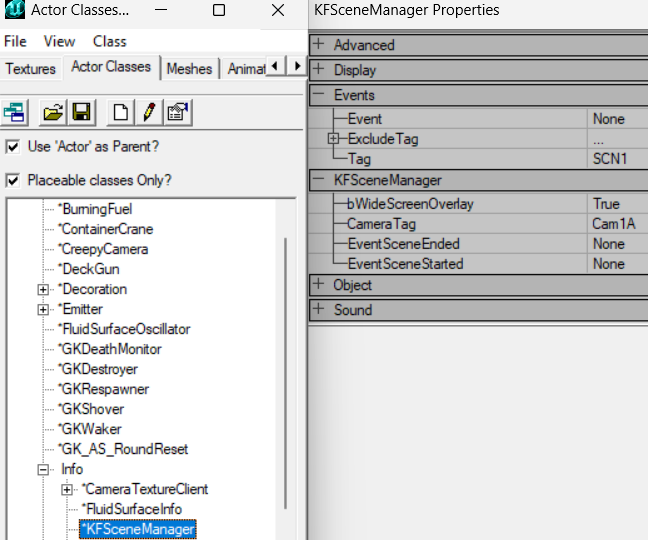
KFSceneManager:
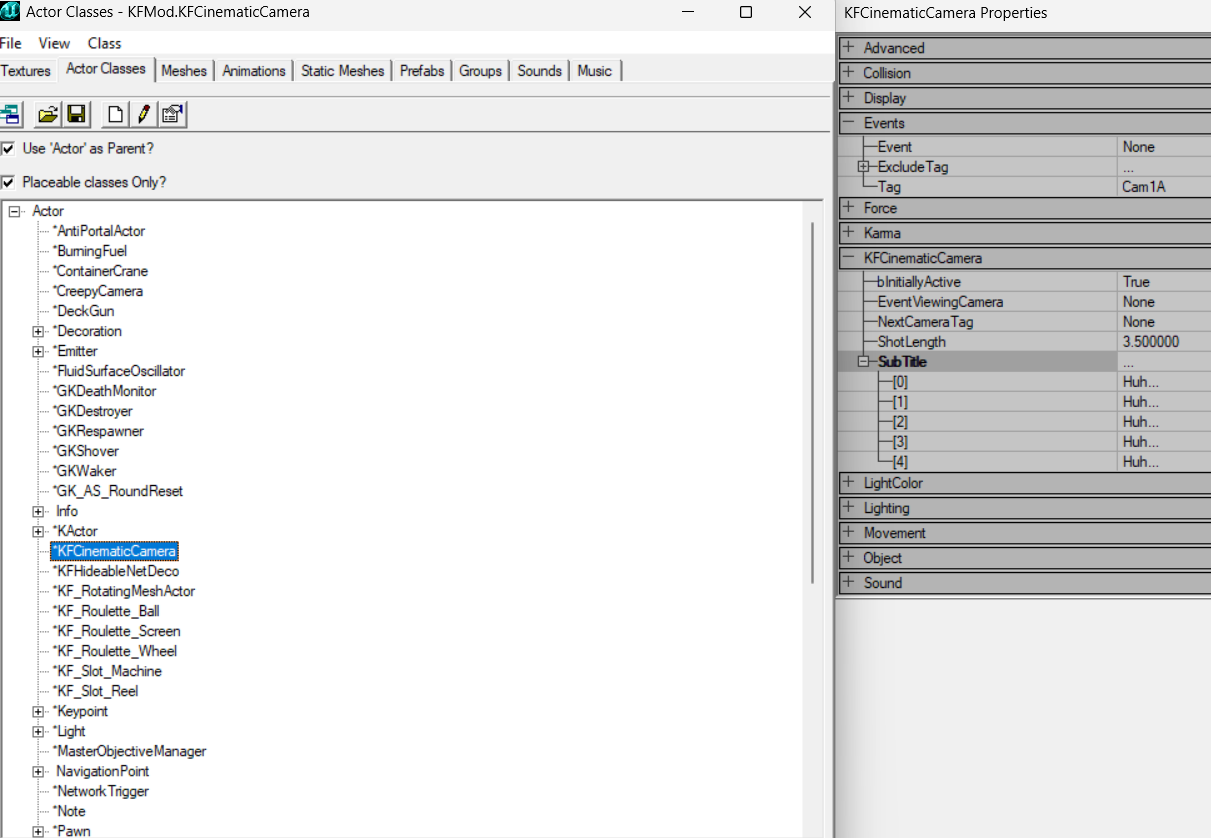
Cinematic Camera:
Not covered: Obj can be triggered while not in play, can make objective conditions dependent on objective conditions in KFStoryObj, wave designer + squad designer sets up what zeds spawn from whatever ZedVolumes.
// ProTip: For welder objectives copy-paste KFStoryObj actor from official maps — they do complicated stuff (including unique actors, 2+ conditions per welder box and HUD stuff). Not worth the misery.
// ProTip2: When designing objectives that require a volume, you can use any volume as long as you input its name (under Properties → Object → Name) into the objective condition. So I recommend using the standard Volume. The objective volume has extra code where it spams "Forbidden!!!" in chat if you go inside of it before the objective is activated.
Further Reference
For Wave/Squad Designers (zed spawns) and little KFO tips like a reminder of where to find the actors you need, in actor browser, reference this guide → https://steamcommunity.com/sharedfiles/filedetails/?id=357491760
For tips on other stuff I missed — like Progress Events, which is a part of objective conditions, reference this guide: https://wiki.tripwireinteractive.com/index.php?title=Objective_Mode_(Killing_Floor) OR this guide: https://forums.tripwireinteractive.com/index.php?threads/kfs-containment-story-map-tutorial.80381/
BugsBugsBugs:
- As v briefly mentioned in the TWI wiki above, Wave Designers (for zed spawns) only support 1 wave per actor (V 5 2), they definitely will look like they should work but it'll be like 10-30% of the time so plz, spam wave designers.
- PROBLEMS WITH ZEDS DYING ON SPAWN? This is so annoying but disable (KF_LevelRulesStory or LevelInfo?) -> killStragglers and see if its still there. If not you my lucky friend have an issue related to pathing.
- The KFO HUD such as your objective name and details (top corner), breaks by more or less deleting itself after ~30-60mins time for no reason. You can witness this consistently on the kfo-30waveChallenges. Soo, while you can put hints there maybe not provide info absolutely required for progression into the HUD.
- World hints that you'd use in KFO such as the small "Gold Bar" text in kfo-steamland (as well as being unreliable) also sometimes conflict for god knows why. As such clientside you may see a community kfo world hint replaced by a different official KFO-map's world hint or whatever kfo-map you played last. For example, I constantly see world hints telling me to go pick up a non-existent gold bar (<3 TWI) lol.