🧰 DeepDive – Assets
Static Meshes:
It turns out converting BSP to static meshes isn’t so great because complex BSP geometry is murder on your map's performance. The best, most optimized SMs are always designed in proper modelling software like 3DS Max and Maya, and they ofc have fees D:<
Alternatively, using stock map folders, you can take almost any SM from a KF map and use it, rescale (try to keep 3 only re-scaled variations max for optimisation), rotate and re-purpose to decorate your own. It relies entirely on radical ideas and improvisations (such as clipping decapitated heads over corpses lol) but also takes way less time than designing your own anyway.
So feel free to reference this SM spreadsheet I put together: 👉 SM Spreadsheet
If you want to help add to the SM spreadsheet, feel free to join the Siren Torturers Discord and inquire about it there because they formatted it way better than my stupid ass ever could xd
Stock KF map resources look better, and always will be yours for the taking. Just don’t forget to add your own original touches to your map.
Next is an optional section on 3D modelling for KF1 (skip to Texture Providers if not your thing).
Speaking of being sneaky, you could also use **Blender** to design static meshes as it’s well known, perfectly FREE, 3D design software.
The only drawback is they don’t support .ase or .lwo exporters **officially**. **And you’ll need to track down an importer separately.**

Try https://github.com/DarklightGames/io_export_ase

^After that open Blender, search in Edit Preferences → Install add-on, and once installed search in there for “asci” and tick it.
Now you can make simple, custom meshes and export them into KF (with textures separately) for free, but you won’t be able to import them from KF into Blender without other stuff xD. Whew.
- Alternatively, there’s like a dozen Blender exporters + tutorials here: https://web.archive.org/web/20140727193238/http://wiki.beyondunreal.com/Blender
- Milkshape (isn’t as good as Blender ofc) but has a built-in .ase exporter you can rely on.
- Here’s also some reliable looking, old 3ds Max downloads I found if it suits you: #1 + #2 (Even with a paid license it’s impossible to get, so no copyright infringement intended :c)
Once you have a (.ase .psk or .lwo) SM on hand, all you need to do is open the SM Browser, go to File → Import → Your SM and voilà!
If you want the custom SM to be downloaded by players in the map file, import it into the myLevel package when prompted. Otherwise, place it in your own named SM package, which will have to be downloaded alongside the map (only for the largest maps please, admins don't like extra packages).
IMPORTANT NOTE: If you’re modelling a mesh with multiple material instances / UVs, do test your exporter — a lot of them won’t work unless you have magic fingers.
Tip: Umodel is REALLY GOOD for bulk exporting KF assets. The same site also provides Un+ActorX plugins for 3DS Max import/export (see Porting Guide section for bulk exporters): https://www.gildor.org/en/projects/umodel (Found a vid too but maybe watch on 3× speed — he's underestimating our intelligence xd): https://www.youtube.com/watch?v=Uhky1b5YBoM
Texture Providers:
Assuming you have software like GIMP to convert file types to .dds, and follow the import rules (dimensions x²), here’s a small list of texture providers you may consider:
- Poly Haven
- Textures.com
- AmbientCG
- Texture Ninja
- OpenGameArt
- itch.io Assets
- Poliigon (these ones prob overkill)
- Sketchup Texture Club
Free textures galore!
General Tip:
If you import custom textures, consider the advice on the TWI mapping guide for final edits:
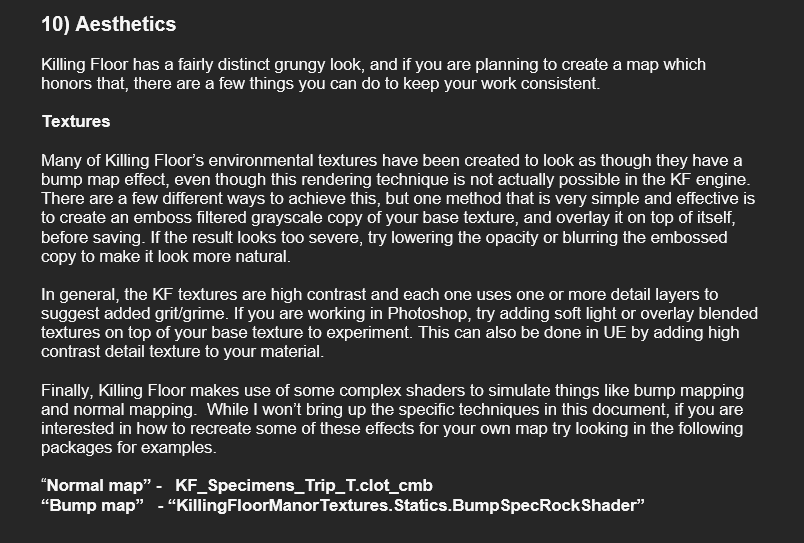
👉 https://docs.gimp.org/2.10/en/gimp-filter-emboss.html
However, rely on the game’s resources as much as possible (at least while learning). That means using static meshes and textures from official KF maps.
If you have those moments when you’re not feeling very creative — even when you know what to do next — it helps to browse through stock assets on “breaks.”
Don’t forget search engines and Pinterest have an infinite supply of reference images too 😄