🗂️ Basics on Browsers
Once you’ve prepared a rough shape of section/s in your map (using cube builders, subtract and odd tools on the left side of your screen), 3 things that should get your attention are these little icons near the top of your screen:
[
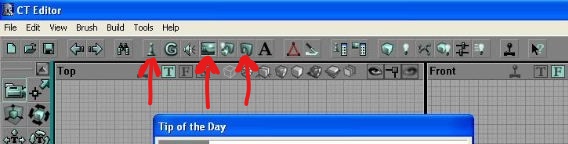
First is the actor class browser - chess pawn icon, next is your texture browser - a painting -, and on the right is the static mesh browser in the form of an arch.
The Actor Class Browser contains every invisible aspect of the map that directly or indirectly affects the player and their visible surroundings. A few examples include: To use them you have to highlight the name of the actor you want, right click on map → insert actor 'X'
The Texture Browser contains almost every surface 'wallpaper' used in KF maps (Image/Colour data). Just find the right one for your floor, wall or ceiling and apply it with a double click. FYI some are also converted into Materials, to be wrapped around StaticMeshes (SM). I won’t go into depth myself but regarding supported textures, transparency (alpha), and otherwise, reference this: https://docs.unrealengine.com/udk/Two/UnrealTexturing.html
//proTip: For custom texture stuffs download something like GIMP, you can easily import/export through Tex browser (.dds and x² dimensions required) then filter, combine or crop stock textures with more creative control (like for SMs). Also a cool tut here: https://forums.tripwireinteractive.com/index.php?threads/texturing-tutorial-thread.55519/
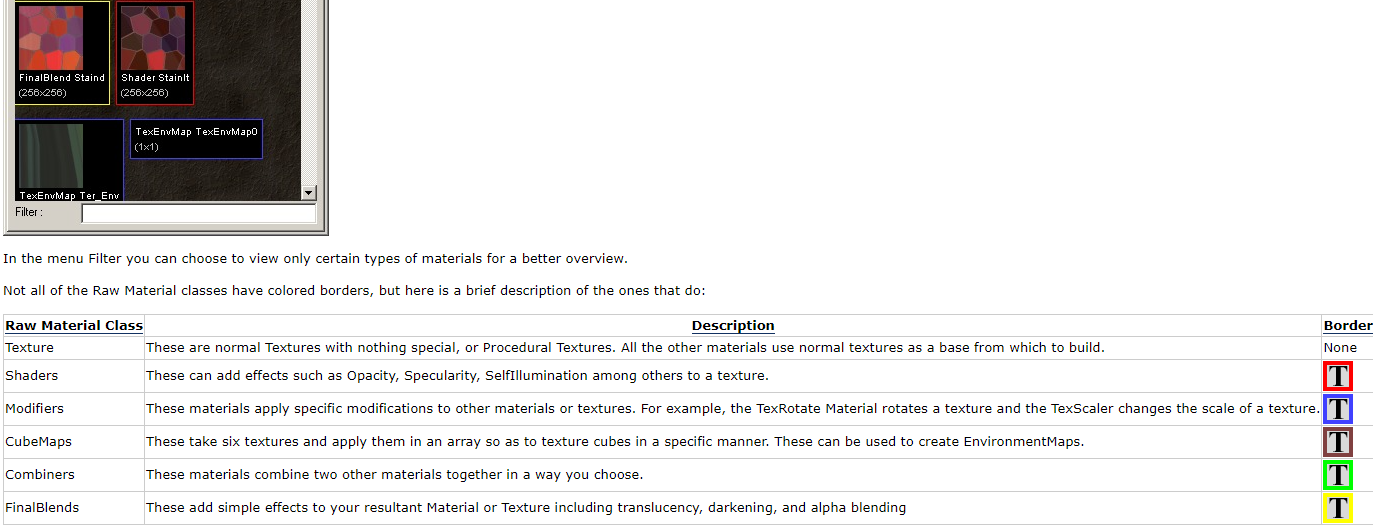
//proTip2: However, if you plan to mostly work with textures only for KF, for file size + optimisation it is definitely worth learning the inbuilt material classes (They do work!) → the Material Modifier is particularly simple to use and the UDN Site Map explains it well:
Finally, we have the Static Mesh Browser. Each Static Mesh is technically of the Object Actor Class AND they can also be applied to give other actors tangible form in game. But to simplify, SM (static meshes) are pre-made 3D objects you can place in the world.. Doors, tricycles, radioactive mushrooms and dosh for instance…
Although the shapes are archived, you can create simple ones of your own using an assortment of brushes in the editor. You just have to make a BSP structure, select all the coloured outlines known as brushes in the 2D viewports, or Wireframe in the 3D viewport, then right click → convert to static mesh.
Whatever textures you had applied to the object will save with the SM into a package of your choice ('myLevel' or your own custom package). You could also imagine them as recycled objects… You don’t have to start making them from scratch every time you want to use them, people can render and cull them in-game easier and it solves global warming! Thus, you can put as many copies of tricycles in your map as you like.